> ## Documentation Index
> Fetch the complete documentation index at: https://docs.zuddl.com/llms.txt
> Use this file to discover all available pages before exploring further.
# Ticket creation
> Learn all about ticket creation in Zuddl
**Supported event types**\
Virtual ✅ | In-person ✅ | Webinar | Field event | Third-party
Every attendee's journey starts with a ticket. Zuddl’s ticket-creation workflow lets event teams design revenue models, gate premium experiences, and steer audience composition—without spreadsheets or custom code.
***
## Ticket type
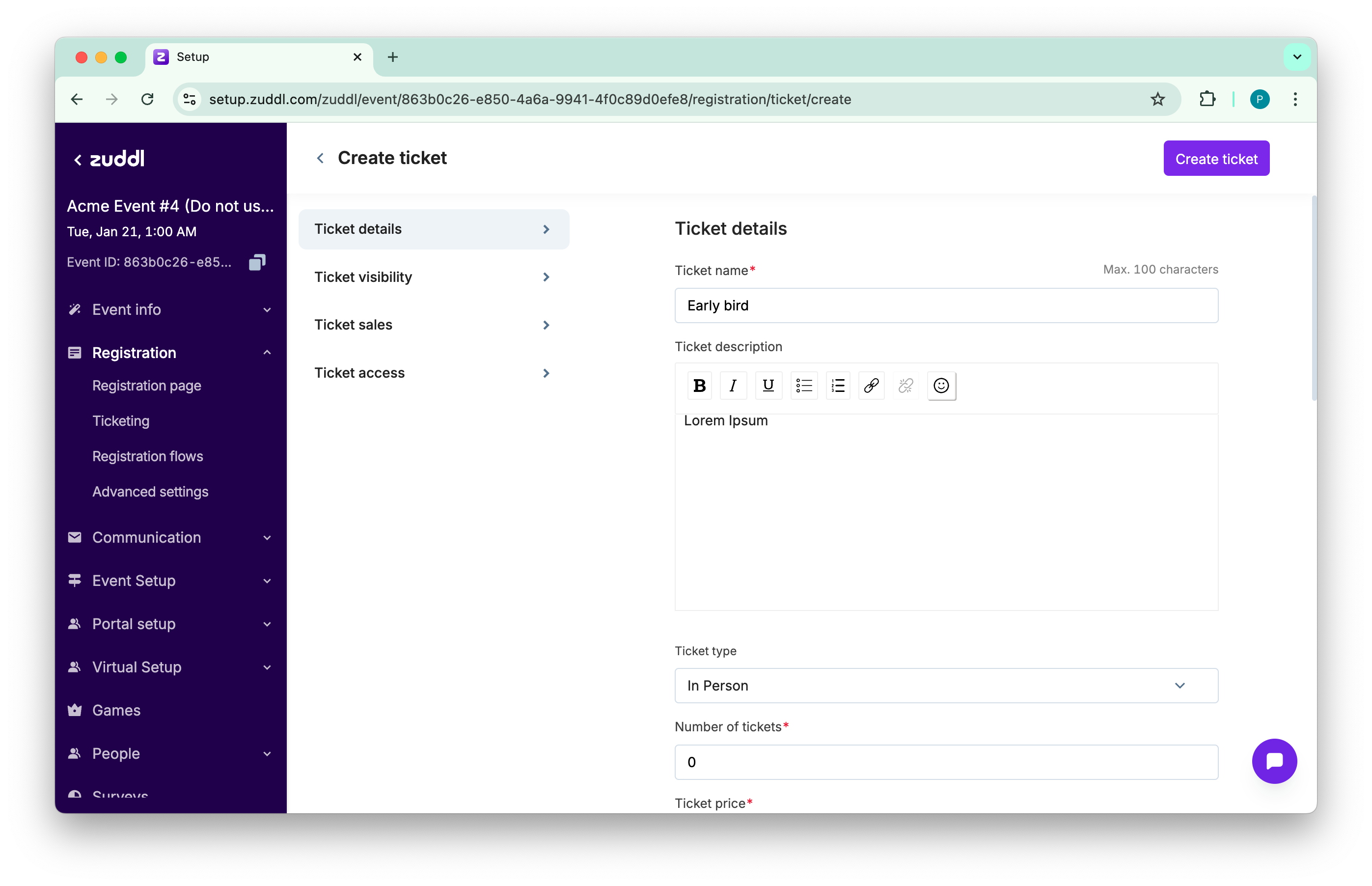
When you create a ticket, the **Type** field sets the experience you are selling—Virtual, In-Person, or Hybrid. Zuddl uses that flag to surface the right join link or venue address in confirmation emails, show the correct calendar block, and filter access to virtual stages or on-site check-in scanners. \
\
For example, a road-show stops in three cities but streams the keynote worldwide. The team issues an in-person ticket that includes lunch, plus a Virtual ticket that skips catering overhead. Separate types keep budgets clean and reporting apples-to-apples.
 ***
## Quantity and capacity
Number of tickets limits inventory for that tier. The moment capacity hits zero, Zuddl hides the Buy button—or, if you prefer, triggers the wait-list flow. A startup summit capped “Founder Pass” at 150 seats; the tier sold out in two days, creating social proof that boosted overall ticket velocity.
***
## Quantity and capacity
Number of tickets limits inventory for that tier. The moment capacity hits zero, Zuddl hides the Buy button—or, if you prefer, triggers the wait-list flow. A startup summit capped “Founder Pass” at 150 seats; the tier sold out in two days, creating social proof that boosted overall ticket velocity.
 ***
## Price and currency
Enter a numeric price and choose a currency from your connected merchant account. Free tickets skip payment collection and shorten checkout friction; paid tickets send revenue and tax data to merchant accounts.
## Sales window
**Sales start** and **End dates** define when a ticket is visible. Early-bird and late-registration tiers stagger automatically. A nonprofit used a 30-day early-bird window to forecast preliminary revenue and negotiate venue contracts with confidence.
***
## Visibility and locking
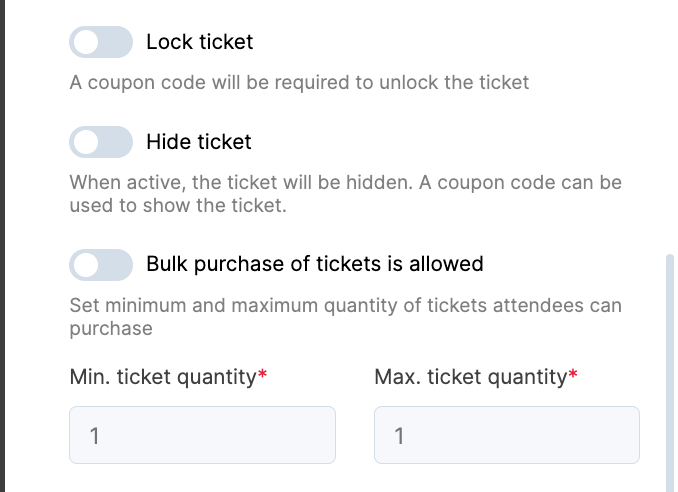
Toggles let you mark a ticket **Inactive**, **Hidden**, or **Locked**.
* **Inactive** takes the ticket offline but preserves analytics—useful for archiving outdated tiers.
* **Hidden** hides the ticket unless a matching coupon code is applied, ideal for partner blends.
* **Locked** shows the ticket but greys the Buy button until a coupon unlocks it—useful for VIP invitations that tease value while keeping gatekeepers in control.
***
## Bulk purchase controls
Switch **Allow Bulk Purchase** to let a buyer reserve multiple seats in one transaction, then set minimum and maximum quantities. By setting bulk buying limit, you can prevent free ticket hoarding while still empowering corporate buyers to secure team passes.
***
## Access filters
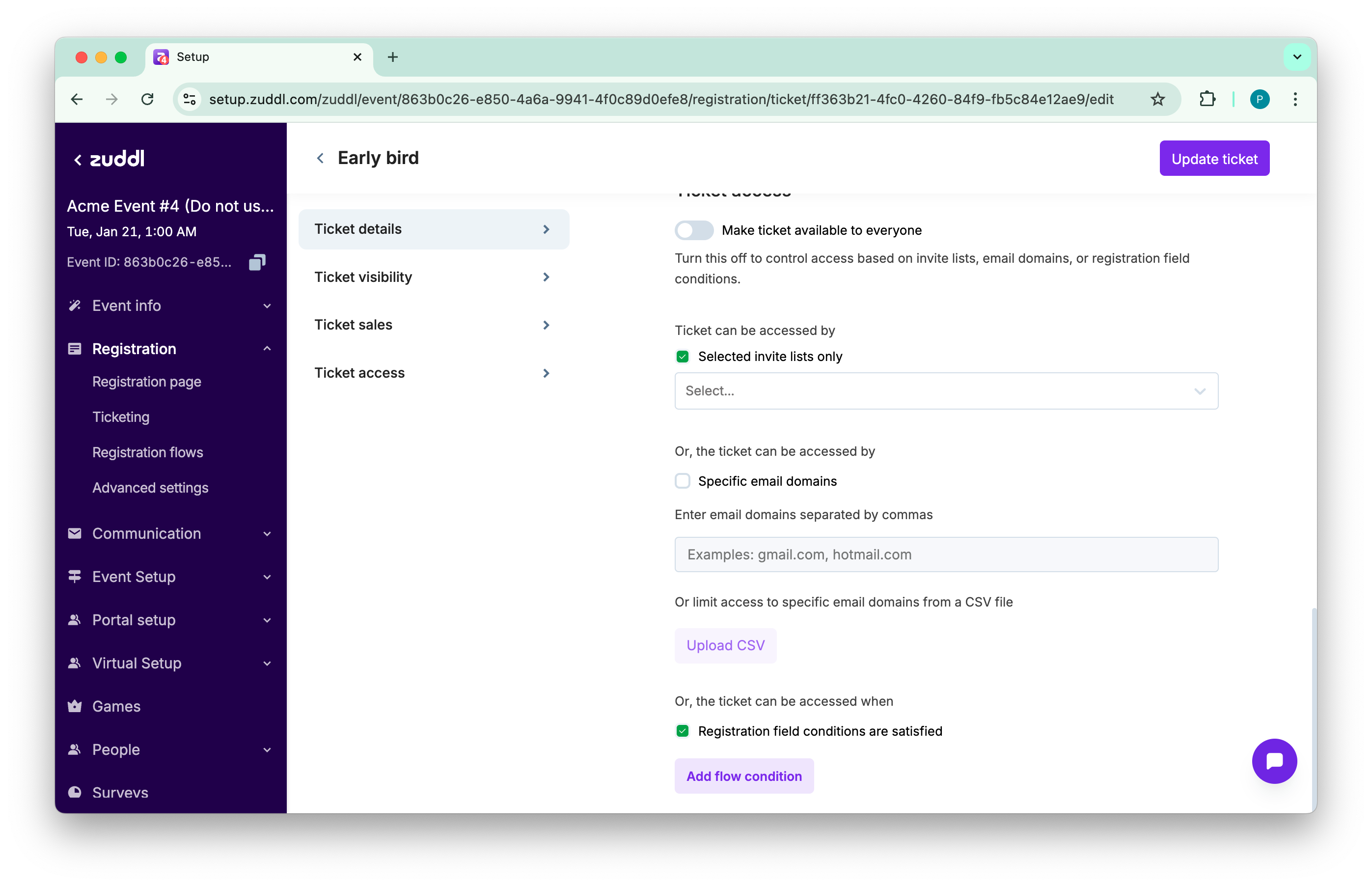
Turn off **Available to Everyone** to expose three granular gates:
* **Invite Lists**—restrict to select invitees under *Audiences*.
* **Email Domains**—allow or deny domains like “@edu” for student discounts or corporate exclusivity.
* **Flow-Based Conditions**—tie ticket visibility to answers given in the registration form (e.g., show “CTA Workshop” only if the registrant selected *Advanced* skill level).
These filters prevent mismatch between ticket perks and attendee profile, saving support from refund loops.
***
## Flow-based conditions
You can stack multiple conditions with **AND/OR** logic. Zuddl evaluates them live, so last-minute form edits still gate correctly. A cybersecurity event combined *Country = India* **AND** *Job Level = CXO* to surface a “CXO Dinner” ticket only to qualified leads, preserving table capacity and sponsor prestige.
***
## Price and currency
Enter a numeric price and choose a currency from your connected merchant account. Free tickets skip payment collection and shorten checkout friction; paid tickets send revenue and tax data to merchant accounts.
## Sales window
**Sales start** and **End dates** define when a ticket is visible. Early-bird and late-registration tiers stagger automatically. A nonprofit used a 30-day early-bird window to forecast preliminary revenue and negotiate venue contracts with confidence.
***
## Visibility and locking
Toggles let you mark a ticket **Inactive**, **Hidden**, or **Locked**.
* **Inactive** takes the ticket offline but preserves analytics—useful for archiving outdated tiers.
* **Hidden** hides the ticket unless a matching coupon code is applied, ideal for partner blends.
* **Locked** shows the ticket but greys the Buy button until a coupon unlocks it—useful for VIP invitations that tease value while keeping gatekeepers in control.
***
## Bulk purchase controls
Switch **Allow Bulk Purchase** to let a buyer reserve multiple seats in one transaction, then set minimum and maximum quantities. By setting bulk buying limit, you can prevent free ticket hoarding while still empowering corporate buyers to secure team passes.
***
## Access filters
Turn off **Available to Everyone** to expose three granular gates:
* **Invite Lists**—restrict to select invitees under *Audiences*.
* **Email Domains**—allow or deny domains like “@edu” for student discounts or corporate exclusivity.
* **Flow-Based Conditions**—tie ticket visibility to answers given in the registration form (e.g., show “CTA Workshop” only if the registrant selected *Advanced* skill level).
These filters prevent mismatch between ticket perks and attendee profile, saving support from refund loops.
***
## Flow-based conditions
You can stack multiple conditions with **AND/OR** logic. Zuddl evaluates them live, so last-minute form edits still gate correctly. A cybersecurity event combined *Country = India* **AND** *Job Level = CXO* to surface a “CXO Dinner” ticket only to qualified leads, preserving table capacity and sponsor prestige.
 ***
## Add-ons & bundles
Tickets act as parents for Add-Ons—session packs, merch, or certification exams. Because add-ons inherit the ticket properties, finance receives one unified invoice, yet attendees customize their agenda. This hierarchy raises average order value without confusing buyers with multiple separate ticket tiers.
***
## Approval requirement
Toggle **Manual Approval** when you need to vet registrants—press passes, employee tickets, or limited-seating workshops. Pending requests queue in the *People → Approvals* tab; once approved, Zuddl auto-triggers payment or confirmation emails.
***
***
## Add-ons & bundles
Tickets act as parents for Add-Ons—session packs, merch, or certification exams. Because add-ons inherit the ticket properties, finance receives one unified invoice, yet attendees customize their agenda. This hierarchy raises average order value without confusing buyers with multiple separate ticket tiers.
***
## Approval requirement
Toggle **Manual Approval** when you need to vet registrants—press passes, employee tickets, or limited-seating workshops. Pending requests queue in the *People → Approvals* tab; once approved, Zuddl auto-triggers payment or confirmation emails.
***